
Google Analytics 4 silently recently rolled out an update with a few new date presets like "This month" and "Last month." But what they gave in convenience, they took away in accuracy. In the very same update, they quietly removed the ability to do a true, day-of-week aligned year-over-year comparison, a feature that was essential for anyone who needs their reports to be accurate.
This quiet removal is a major is a slight step backward for data integrity. Without it, you could be comparing a high-traffic Monday from this year to a low-traffic Sunday from last year, all while the report acts like it's an apples-to-apples comparison. This fundamental flaw leads to skewed data, flawed insights, and bad business decisions.
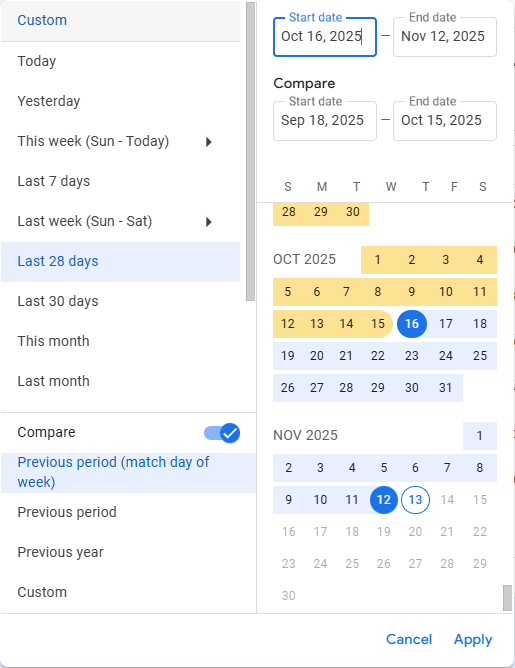
To make matters worse, even the new presets are stuck in GA4's notoriously clunky interface. It still takes at least three clicks to apply a date range and another three just to turn off a comparison. The workflow is now not only less accurate, but it remains painfully slow.
This is exactly why we updated the GA4 Optimizer extension. We don't just solve one of these problems; we fix both. We've restored the critical day-of-week aligned YoY comparison and put it, along with every other preset, right behind a single click.
The Problem: A Few Steps Forward, One Big Step Back
The new native presets are helpful, but they don't solve the core usability problem. The GA4 date picker is still a workflow killer. Applying a "Last Month" view still takes three clicks. Adding a simple comparison takes another couple clicks.
And once you've set a comparison, turning it off is just as tedious. You have to reopen the menu, find the toggle, switch it off, and click 'Apply' at least three more clicks just to get back to your original view. This constant friction pulls you out of your analysis for the most basic tasks.
The bigger issue, of course, is the lack of robust date comparison options. Comparing January 15-21, 2024 (a Monday-Sunday) with January 15-21, 2023 (a Sunday-Saturday) is not an apples-to-apples comparison. Your weekend traffic patterns are now being compared to weekday patterns, which can skew your metrics and lead to incorrect conclusions.
For serious analysis, you need to compare Monday to Monday, not the 15th to the 15th.
The Solution: We Didn't Just Add Presets, We Added Precision
This is exactly why we updated the Data Range Presets feature in our GA4 Optimizer extension. We don't just give you one-click access to presets; we give you precise control over your comparisons.
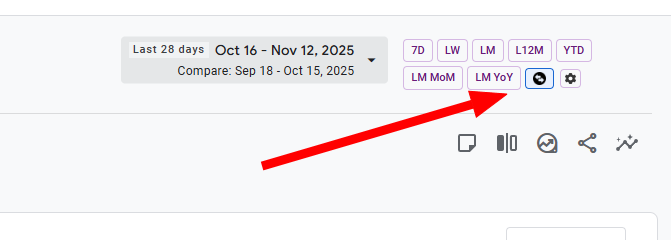
Our feature places a simple row of buttons next to the date picker, turning a 5-click hassle into a single click. But the real power is in our smart Compare button, which acts as a powerful toggle with three distinct modes:
- Click: Instantly compare vs. the Previous Period with weekday alignment. Perfect for month-over-month or week-over-week analysis.
- Shift + Click: Compare vs. Last Year using the exact same dates. Quick and simple for a basic YoY snapshot.
- Ctrl + Shift + Click (Cmd on Mac): The one you've been missing. Compare vs. Last Year with Day of Week Alignment. This is the most accurate way to do year-over-year analysis, ensuring your weekdays always line up.
What took 5-10 clicks in the standard GA4 interface (and wasn't even fully possible) now takes a single, intuitive click or key combination. And to turn it off? Just click the button again. One click on, one click off. No menus, no extra steps.
Stop Clicking, Start Analyzing with Confidence
Google's update is a good start, but it doesn't solve the fundamental workflow issues or the need for more accurate comparison tools.
The GA4 Optimizer extension was designed to fix these exact frustrations. We give you the speed you need with one-click presets and the accuracy you can trust with powerful, aligned comparisons.
Frequently Asked Questions (FAQ)
Q: What new date presets did Google add to GA4?
A: Google Analytics 4 recently added several new date range presets including 'This Month', 'Last Month', and 'Quarter to Date'. These presets help users avoid manually selecting dates in the calendar picker, though they still require multiple clicks to apply and remove comparisons.
Q: Why is day-of-week alignment important for year-over-year comparisons?
A: Day-of-week alignment ensures you're comparing like days to like days. Without it, you might compare weekend traffic to weekday traffic, which can skew metrics and lead to incorrect conclusions. For accurate year-over-year analysis, Monday should be compared to Monday, not just the 15th to the 15th.