Google is notoriously quiet when rolling out structural changes to the Google Analytics 4 interface. If you log into your GA4 property this week and open the Admin panel, you might notice a brand new section sitting at the top of the menu labeled Data manager BETA.
This is not just a cosmetic redesign or a dedicated page for linking external accounts. It is the frontend of a massive architectural shift regarding how data enters the Google ecosystem.
For years, getting external data into GA4 was a fragmented and frustrating process. You had to navigate to Product Links for Google tools, use the Data Import menu for manual CSV uploads, and rely on developer-heavy Measurement Protocol documentation for server-side events.
The new Data Manager consolidates all of these ingestion methods into a single visual UI. More importantly, it introduces native integrations for Google's biggest competitors. Here is a complete breakdown of what the new Data Manager does, what data Google is asking for, and the strategic tradeoff of centralizing your data.
What is the GA4 Data Manager?
The Data Manager is a unified data ingestion service. Its primary goal is to simplify how administrators connect, map, and monitor data flowing into their GA4 properties.
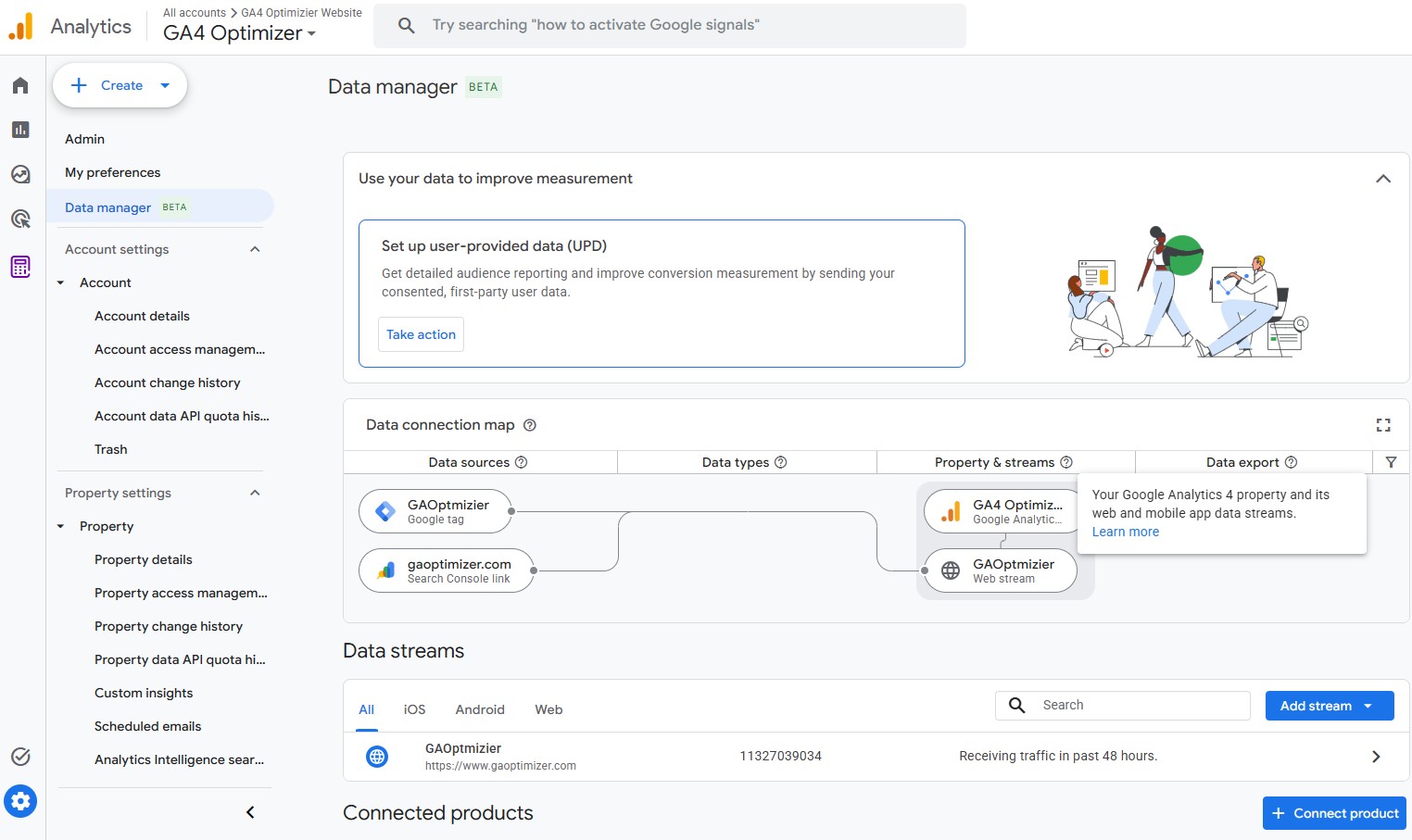
When you open the new interface, the first thing you see is the Data connection map. This is a visual flowchart that traces data from its original source, through your Google tags, and into its final destination properties and streams. For agency analysts who inherit messy accounts, this map instantly solves the headache of auditing where a property's data actually originates.
Below the map, Google categorizes data connections into three primary pillars.
1. Centralized Google Product Links
Previously, connecting Google Ads, Search Console, BigQuery, and Merchant Center required hunting through separate sub-menus in the Admin panel. The Data Manager brings every available Google product link into one grid. You can view the status of your connections, manage active links, and initiate new product integrations without leaving the page.
2. Native Third-Party Integrations
If you scroll down to the "Featured products" section, you will see connections that were previously impossible to configure natively. Google is building direct bridges to ingest campaign data, ad costs, and offline CRM conversions from their biggest competitors.
Clicking into these individual connectors reveals exactly what Google expects you to import:
- Meta, Pinterest, Reddit, and Snowflake: Configured specifically to ingest Campaign data (costs, clicks, and impressions to optimize ad spend reporting).
- Salesforce (ALPHA): Configured to import Event data (offline CRM lifecycle stages and lead conversions).
- SFTP and S3: Broad ingestion pipelines for automated user data, item data, and custom event parameters.
Historically, bringing Meta cost data into Google Analytics required expensive third-party middleware like Supermetrics or Zapier. With these new native connectors, Google is removing the technical friction of centralizing your business data.
3. User-Provided Data (UPD)
At the very top of the Data Manager, Google placed a massive call-to-action banner for setting up User-Provided Data.
As browser privacy restrictions and cookie deprecation continue to erode standard tracking, Google needs advertisers to supply first-party data to maintain tracking accuracy. The UPD feature allows you to securely send hashed customer information, such as email addresses and phone numbers, directly to Google's servers. This data is then used to stitch together cross-device user journeys and improve conversion modeling.
The Strategic Dilemma: Data Governance vs. Convenience
The introduction of the Data Manager BETA brings an immediate workflow improvement. The ability to natively authenticate and import cost data from Meta and TikTok is an operational win for small to mid-sized businesses. It provides a free, unified dashboard to calculate Return on Ad Spend (ROAS) across all channels without paying for third-party data pipelines.
However, pumping this level of external data into GA4 requires a thoughtful data governance conversation.
These free integrations come with a strategic tradeoff. By providing Google with your hashed CRM data, offline Salesforce events, and multi-channel ad spend, you are feeding their conversion modeling algorithms with your broader business intelligence.
For many organizations, the convenience of a unified reporting dashboard and improved Google Ads performance is well worth this exchange. For others, particularly enterprise organizations, there is a preference to keep the ultimate source of truth in an independent data warehouse rather than centralizing all competitive intelligence inside a specific advertising platform.
The Catch: Ingestion Does Not Fix Reporting
If you decide the operational benefits of importing this data outweigh the governance concerns, you still face one major hurdle.
The ultimate irony of the Data Manager is that while Google is building a massive, streamlined funnel to collect your data, the interface required to analyze that data remains notoriously rigid. You can import all the Meta cost data and Salesforce offline conversions you want, but you still have to navigate GA4's clunky Standard Reports and heavily sampled Explorations workspace to actually make sense of it. Extracting basic insights often requires excessive clicks, buried menus, and frustrating pagination limits.
If you are going to centralize your external data in GA4, you need an interface capable of analyzing it efficiently.
This is exactly why we built the GA4 Optimizer Chrome extension. When your third-party cost data finally lands in your GA4 standard reports, our extension allows you to apply Advanced Table Filters to slice that data instantly. You can set conditional logic to view campaigns with "Spend > $500" without fighting the native search bar. You can also use our Quick Calculated Metric feature to build custom conversion rates on the fly directly in your data tables, and bypass pagination restrictions with a 500-rows-per-page toggle.
Google is finally fixing their data imports. Install GA4 Optimizer today to fix your reporting.