Many marketers assume their Google Tag Manager configuration is private because it requires a Google login. It is not private. If your container loads in a user's browser, your entire tagging architecture is a public file sitting on the internet.
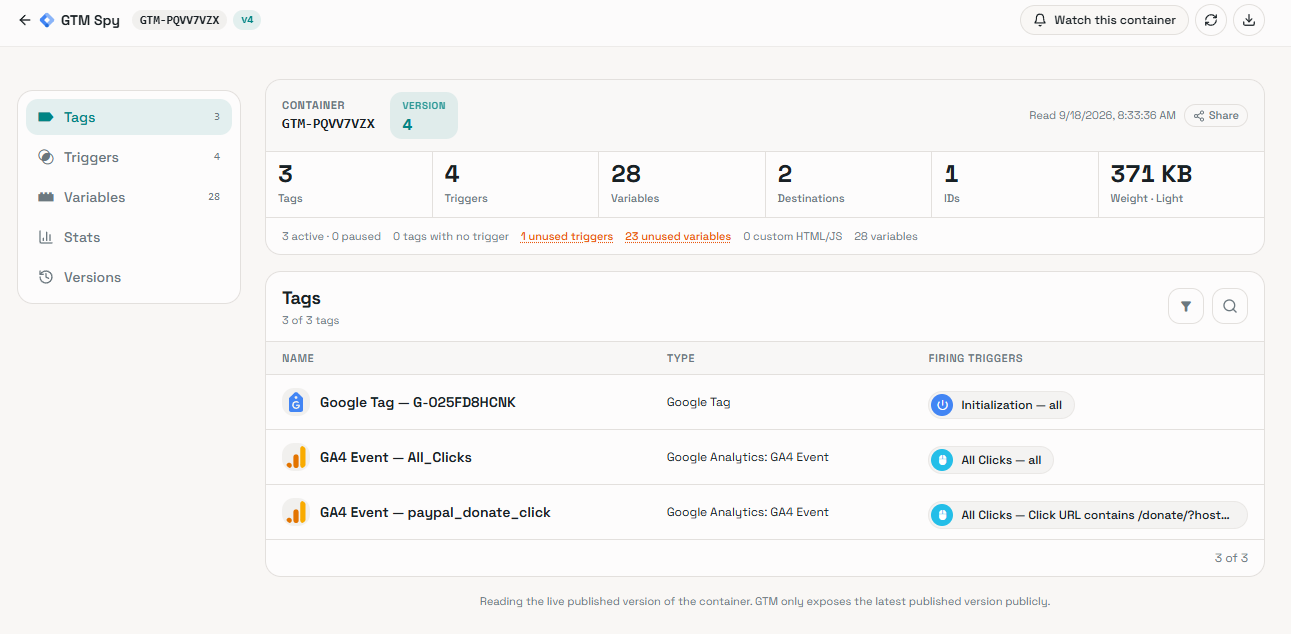
A recent update to GA4Spy makes this reality impossible to ignore. The auditing tool allows anyone to enter a website URL and instantly view its triggers, tags, and variables. It was built by Brais and his team, who are already known in the community for creating the GA4 Dimensions & Metrics Cheatsheet. That foundational groundwork extracted Google's API names and equipped dozens of GTM and GA4 tools that agencies rely on today. While the GA4Spy platform already exposes public configurations for GA4 and Firebase properties, their new GTM scanner brings that exact same transparency to your tag management architecture.
When marketers first see this, the immediate reaction is panic. How is this legal? Is Google being hacked? Why does Google allow third-party sites to download proprietary tracking setups?
Here is the technical reality of how tools like GA4Spy work, why Google has no choice but to expose your data, and how you can actually secure your tracking architecture.
Is GA4Spy Legal? Why Google Allows This
GA4Spy is not a hacking tool. It exposes the inherent vulnerability of client-side tracking, and what it does is 100% legal.
Web browsers do not have hidden, authenticated access to Google's backend servers. To fire your marketing pixels, Google must send your trigger logic (the gtm.js file) directly to the user's device.
A web browser cannot execute code it cannot read. Because Google delivers this file to the public internet so browsers can download it, the file is public by default.
Client-side GTM containers are simply JavaScript files hosted on Google's public content delivery network. Anyone who knows how to locate the gtm.js file in their browser's network tab can download and read the code. GA4Spy automates this process. It takes the public GTM-XXXXXX ID, fetches the file, and visualizes the configuration in a clean user interface.
While alarming to site owners, tools like GA4Spy serve a legitimate purpose in the analytics community. Agencies use it to audit prospect setups before gaining backend access. They also use it to confirm that a client properly implemented the required tags. Analysts use it for educational research, scanning established brands to learn how industry leaders structure their dataLayer schemas and custom trigger logic.
The tool itself is a net positive for the industry. However, it forces organizations to confront an uncomfortable truth about the data they broadcast to the public.
The Dark Side of Public GTM Containers
Because the data is public, opportunistic entities use these exact methods to extract your tracking architecture.
When you leave your entire tracking configuration in a client-side Web Container, you expose your business logic. Competitors can plug your container ID into an auditing tool and reverse-engineer your marketing stack. While your internal UI naming conventions are stripped out by Google during publishing, outsiders can still see exactly which vendors you use, your proprietary GA4 event taxonomy, and your raw third-party pixel IDs.
This level of transparency means you must be incredibly careful in GTM. Any mistake you make is instantly public.
Client-side exposure creates a massive legal liability. Privacy auditors and compliance agencies routinely scan public GTM containers looking for lawsuits. If you make a mistake and your container shows Meta or TikTok pixels firing on an "All Pages" trigger without a proper Consent Initialization check, an auditor knows instantly that your website violates GDPR or CCPA regulations. They do not even need to interact with your cookie banner to find the compliance failure.
The Server-Side GTM Illusion (The Hybrid Trap)
Many organizations recognize these risks and purchase Server-Side GTM (SGTM) hosting to secure their data. Unfortunately, most companies implement SGTM incorrectly. They buy a cloud server but leave their sensitive marketing tags inside their browser-based Web Container.
If you leave tags in your Web Container, they remain 100% public.
Consider a typical e-commerce brand that recently invested in SGTM hosting. If you run their public Web Container ID through an auditing tool, you will often still see a long list of active client-side tags. Their Web Container remains full of Meta Pixels, LinkedIn Insight tags, Microsoft Advertising UET tags, and Custom HTML snippets. Because these tags were left in the client-side environment, any scraper can read them perfectly.
Buying a server does not magically protect your data. You actually have to move your tags onto it.
How to Actually Secure Your Tracking Setup
To protect your proprietary tracking logic, you must strongly consider adopting a strict SGTM architecture. You need to turn your Web Container into a "dumb conduit."
When you set up SGTM, you use two separate containers:
- The Web Container (Client-Side): This loads in the browser. Its ID is public.
- The Server Container (Cloud): This executes on a secure server. Its ID and contents are completely hidden from the internet.
To secure your setup, migrate your third-party pixels, API keys, and complex data transformations out of the Web Container and into the Server Container.
Your Web Container should only contain routing tags like the Google Tag. Its only job is to collect dataLayer events and route them directly to your server endpoint. When an auditing tool scans a properly secured Web Container, it will hit a brick wall. The scanner will see a generic routing tag, while your actual GA4 Measurement IDs, proprietary tracking taxonomy, and vendor pixels remain safely hidden in the cloud.
Getting Started with Server-Side Hosting
Launching a Server Container is much easier today than it was a few years ago. To get started, you must choose how to host your server environment:
- Self-Hosted: Provision your own server using Google Cloud Platform (GCP) or AWS. This gives you total control over the infrastructure but requires ongoing technical maintenance and cloud expertise.
- Managed Hosting: Companies like Stape, TAGGRS, and Addingwell specialize in managed SGTM hosting. These platforms offer one-click container deployments, predictable pricing, and handle the server maintenance for you.
Once your server is live, you map a custom tracking subdomain to it (like metrics.yourwebsite.com). You then update your client-side routing tags to send their payloads to this new URL. Finally, you configure your hidden Server Container to receive that inbound data and distribute it to your marketing platforms behind closed doors.
Even when you migrate your website tracking to a strict Server-Side architecture, your browser still has to generate the dataLayer events and send the initial payload to your cloud server. While backend API events bypass the browser entirely, your front-end tracking is only as accurate as the data the client sends it. You still need to validate that outbound browser data, but you should not expose your live payloads or internal tracking logic to external tools.

Author's Toolkit: To validate tags and server-side routing securely, we use the free GA4 Live Debugger. It runs 100% locally in your browser so your payloads are never exposed.
Get the GA4 Live DebuggerThe extension specifically detects SGTM endpoints, flagging them with a "1P" (first-party) or "Provider" badge. This allows you to verify that your "dumb conduit" web container is actually routing data to your secure server instead of standard Google endpoints. Best of all, your payload data never leaves your machine, ensuring your testing process remains entirely private.